
How it works
The regime
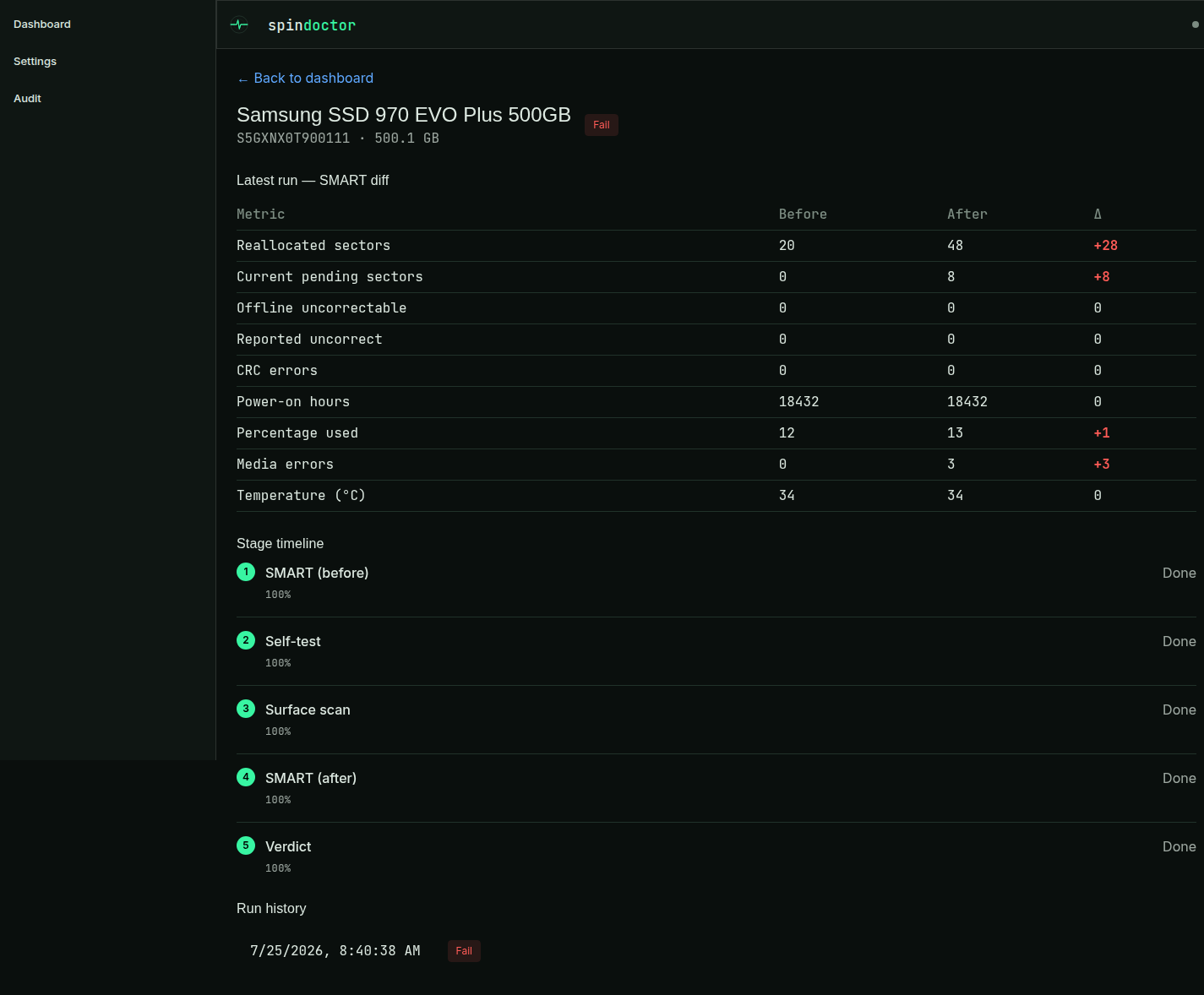
Every test run — manual or auto-mode — walks the same fixed, ordered set of stages:
SMART_BEFORE → SELFTEST_LONG → SURFACE → SMART_AFTER → VERDICT- SMART_BEFORE — a
smartctl -x --json=csnapshot of the drive, parsed into a small set of key metrics (reallocated sectors, pending sectors, uncorrectable counts, CRC errors, SSD/NVMe wear, …) and stored alongside the raw output. - SELFTEST_LONG — starts the drive's own firmware long self-test (
smartctl -t long) and polls it to completion. - SURFACE — a full-surface
badblockspass:-w(destructive, writes and verifies four patterns over every sector) for a destructive run, or plainbadblocks— its read-only test, which reads every sector and writes none — for a read-only scan. - SMART_AFTER — a second SMART snapshot, taken after the self-test and surface stages.
- VERDICT — the before/after SMART diff, the self-test result, and the surface result are evaluated against the configured thresholds into a PASS / WARN / FAIL, with structured, per-reason detail.
Reading the SMART data
Both SMART snapshots are shown two ways in the run detail. The diff table covers the handful of metrics the verdict actually grades, before against after. The attribute table shows everything the drive reported, one row per field, each with a plain-language description of what it measures and a per-row ok / warn / fail flag. Row flags follow the same rules the verdict does, so a red row never sits next to a PASS.
What that table contains depends on how the drive reports health:
ATA/SATA — the standard SMART attribute table, with each attribute's normalized value, worst-ever value and vendor threshold alongside the raw counter.
NVMe — the health-information log: critical warning, percentage used, available spare, media errors, and so on. Drive type is taken from the drive's own SMART data rather than from
lsblk's rotational flag, because a USB bridge doesn't necessarily pass that flag through — a real USB-NVMe enclosure reports itself as rotational, and grading it as a spinning disk would skip the wear and media-error rules entirely. Where the two disagree, the recorded type is corrected once the first SMART read lands.SAS/SCSI — SCSI log pages instead of an attribute table: the drive's own self-assessment, the grown defect list, the error counter log split by read/write/verify (uncorrected, recovered-by-retry, and corrected totals), and the SAS phy link counters summed across every phy.
Whatever the transport, the table also carries the drive's own lifetime minimum and maximum temperature when it keeps them (ATA in its SCT log, SAS in an environmental report page; NVMe reports none). Current temperature tells you about the room the drive is in right now — the lifetime maximum is the only figure in the payload that says anything about the life a used drive had before it reached you. It is shown and explained, never graded: there is no published failure-rate banding for lifetime temperature to put a fair cutoff on, and inventing one is exactly what the thresholds below avoid.
Some of those counters are routinely enormous on a perfectly healthy drive — millions of ECC-corrected reads, thousands of grown defects, hundreds of invalid DWORDs from ordinary cabling — which is the whole reason each row carries an explanation rather than just a number. The raw smartctl --json output for either snapshot is downloadable from the same page.
Already-failed drives stop early
A drive whose very first SMART read already condemns it does not get the rest of the regime. Nothing a later stage could find would clear it — FAIL is FAIL — and the two stages in between are expensive: roughly 90 minutes of firmware self-test, then hours of writing every sector. On a 12 TB SAS disk that is most of a day spent confirming a verdict the first three seconds already gave you.
So after SMART_BEFORE, the baseline snapshot is graded on its own. If it already yields a fail-severity reason — the drive reporting its own health as failing, pending or uncorrectable sectors, reallocated sectors past the limit, exhausted SSD wear, NVMe media errors — the run skips straight to VERDICT:
SMART_BEFORE → SELFTEST_LONG → SURFACE → SMART_AFTER → VERDICT
                  skipped      skipped    skipped
The skipped stages are recorded as Skipped in the run timeline, not as passed, and the verdict carries the reasons that condemned the drive plus a note that the self-test was skipped.
Warnings never trigger this. A drive with stable reallocated sectors, a high-but-stable SAS grown-defect count, link or CRC errors is exactly the drive that most needs the full regime, so it gets it.
Two ways to run everything anyway:
- Settings → Already-failed drives turns the early exit off globally (it is on by default).
- Wipe even if SMART already condemns the drive, in the start dialog, overrides it for a single destructive run — because the destructive pass is also a wipe, and wiping a dying drive before disposal is a perfectly good reason to want every sector written.
Neither affects the safety guards: a mounted, system, or protected drive is never writable, whatever these are set to.
Verdict thresholds
The verdict evaluator is a pure function of the before/after SMART metrics, the self-test result, the surface result, and the configured thresholds.
Where a rule needs a number, that number comes from Backblaze's published per-attribute failure rates (by way of Scrutiny's dataset) rather than from a round figure — see Where the thresholds come from below. The rules, in order:
- Long self-test:
FAILED→ FAIL.ABORTEDorUNKNOWN(didn't complete) → WARN.SKIPPED(never started, because the baseline already condemned the drive — see above) → an informational note only; it cannot move the verdict, since the reasons that condemned the drive are in the same list.UNSUPPORTED(the drive cannot run one — many cheap NVMe controllers don't implement the command) → an informational note only. A drive that never had the feature isn't suspicious for lacking it, and the destructive surface pass, which writes and verifies every sector, is stronger evidence than a firmware self-test anyway.
- Surface scan:
- any bad block found (
badBlocks > 0) → FAIL. - started but didn't finish (aborted, or the tool stopped partway) → WARN.
- never started at all — the surface tool exited without scanning a single block — the run fails with
SURFACE_COULD_NOT_STARTand produces no verdict. A drive that was not measured is neither a PASS nor a WARN, and grading it as "incomplete" is how the 4 TiB block-size bug stayed invisible (see issue #84). The tool's own error is kept on the stage.
- any bad block found (
- Hard uncorrectable indicators (after the test) — any of these
> 0→ FAIL:- current pending sectors
- offline uncorrectable sectors
- reported uncorrectable errors
- Growth during the test window — reallocated sectors or current pending sectors higher after than before → FAIL, even if the absolute after-value would otherwise only warrant a WARN.
- Reallocated sectors (absolute, after the test):
0→ no reason raised (contributes to PASS).1–4(the defaultreallocatedWarnMax) and stable (no growth above) → WARN.> 4→ FAIL.
- SAS/SCSI grown defects — growth during the test → FAIL; any present but stable → WARN. Deliberately no absolute-count rule; see below.
- Spin retries — any
> 0→ FAIL. - Command timeouts —
> 100(the defaultcommandTimeoutWarnMax) → WARN (check cabling and controller). - Interface CRC errors — any
> 0→ WARN (check cabling). - SAS link errors (invalid DWORDs + loss of sync) — any
> 0→ WARN, never FAIL (check cabling and backplane). - SSD/NVMe wear (
percentageUsed, SSD/NVMe drives only):≥ 80%(defaultssdPercentageUsedWarn) → WARN.≥ 100%(defaultssdPercentageUsedFail) → FAIL.
- NVMe media errors — any
> 0→ FAIL.
The numeric thresholds above (reallocatedWarnMax, commandTimeoutWarnMax, ssdPercentageUsedWarn, ssdPercentageUsedFail) are configurable in Settings — see Configuration. The overall verdict is the worst severity across every reason raised: any FAIL reason makes the run FAIL; otherwise any WARN reason makes it WARN; otherwise PASS.
Where the thresholds come from
A SMART counter on its own doesn't tell you much: manufacturer thresholds are often unset, or set so high they only confirm a drive that has already died. What's actually useful is how often drives with a given counter value go on to fail. Backblaze publishes that, from a fleet of hundreds of thousands of disks, and Scrutiny turned it into per-attribute failure-rate bands. The rules above are calibrated against those bands.
A pristine drive — every counter at zero — fails at roughly 2.5% a year. That is the number every rule below is measured against.
| Counter | Observed annual failure rate | Rule |
|---|---|---|
| Current pending sectors | 0 → 2.6% · first error → 34% | any > 0 → FAIL |
| Reported uncorrectable | 0 → 2.8% · first error → 34% | any > 0 → FAIL |
| Offline uncorrectable | 0 → 2.9% · first error → 81% | any > 0 → FAIL |
| Reallocated sectors | 1–4 → 2.7% · 4–16 → 7.5% · 16–70 → 24% | > 4 → FAIL |
| Spin retries | 0 → 5.5% · any → ~56% | any > 0 → FAIL |
| Command timeouts | ≤100 → 2.5% · above → 10% | > 100 → WARN |
| Interface CRC errors | 0–1 → 4.1% · then flat 14–22% at every magnitude | any > 0 → WARN, never FAIL |
One row needs a caveat. Attribute 188 packs up to three separate 16-bit counters into a single raw field, and smartctl passes it through as-is — a healthy drive on our own test rig reports 4295032838, which is really the three values 6, 1 and 1. The published failure-rate bands for that attribute run to 13, 26 and 39 billion, so they contain the same packed composites; only the lowest band describes real timeout counts. spindoctor decodes the field before grading it, and sets its threshold at the top of the one band that is trustworthy.
Two more things fall out of the table:
- The uncorrectable counters have no tolerance band. The first recorded error takes the failure rate to twelve or twenty-eight times baseline. There is nothing to grade gently.
- CRC errors are not a drive problem. The rate jumps once and then plateaus — 15% at 4–8 errors, 15% at 8–16, 14% at 35–70, 18% at 130–260. No dose-response, which is the signature of a cable rather than a disk. So they warn, and never fail, no matter how large the count.
Where the data doesn't support a rule, there isn't one:
- SAS grown defects get no absolute-count rule. Across an 18-drive SAS batch, counts on healthy drives and on drives reporting impending failure didn't just overlap, they inverted: the three drives reporting "data channel impending failure" carried 636, 2601 and 3045 grown defects, while drives reporting OK carried everything from 0 to 7827 — the highest count in the batch was on a drive its own firmware considered fine. Any absolute threshold would have condemned the healthiest disk measured. What counts instead is a defect count that rises while we test, which is the drive retiring blocks under our own load.
- SSD wear keeps its manufacturer reading. Backblaze's SSD population is too small for comparable bands (Scrutiny marks every wear attribute non-critical with no observed thresholds), so 80% warns and 100% fails on the drive's own endurance rating rather than on an observed rate.
One deliberate departure: this tool is deciding whether a drive is fit to be sold on, not whether to warn its owner, so it errs strict. The reallocated-sector cutoff sits at the top of the last band that is statistically indistinguishable from a pristine drive (1–4 → 2.7% against 2.5% baseline), not at the point where the rate becomes dramatic.
Thresholds are stored per install, so an existing deployment keeps whatever it has — a default that changes in a later release does not silently move an operator's configured value. Settings shows the current numbers.
Durable runs
Runs survive a backend restart. On startup, the engine reconciles every run that was left RUNNING or PENDING by a previous process:
- A
SELFTEST_LONGstage that was still running resumes by polling the drive's own firmware state — the self-test itself kept running on the drive across the restart, only this process's tracking of it was interrupted, so it isn't started over. - A
SURFACEstage that was interrupted mid-write/scan is restarted from scratch —badblocksdoesn't checkpoint, so there's no partial state to resume. A destructive surface restart re-runs the safety guards before writing again (see Safety). - Surface restarts are capped: a run that's been restarted too many times is given up on and marked
FAILEDrather than retried forever.
Auto-mode
Auto-mode polls attached drives on an interval and automatically starts a destructive run on every newly-discovered, eligible drive — no manual click required. It is:
- off by default;
- opt-in, gated behind an explicit checkbox acknowledgment in Settings before the toggle can even be enabled;
- still subject to the exact same safety guards as a manual destructive start — a mounted, system, or protected-list drive is never enqueued, auto-mode or not (see Safety).
A drive that's denied by the safety guard is not remembered as permanently ineligible — if it later becomes eligible (unmounted, removed from the protect list), a later poll picks it up.