
Safety
⚠️ This tool is destructive
The surface stage of a destructive test run runs badblocks -w — a write-pattern scan that writes and verifies every sector of the drive. It irrecoverably wipes all data on the drive under test. There is no undo. Only point spindoctor's destructive mode at drives whose data you do not need.
A read-only scan (plain badblocks, which reads every sector and writes none) is available as an alternative when you want to check a drive's surface without touching its contents, but the full regime — and the strongest signal — comes from the destructive path.
The safety guards below apply to both modes. A read-only run writes nothing, but it still keeps a drive busy for hours, and a drive on the protected list is one spindoctor leaves alone entirely.
Always-on guards
These checks run for every start — destructive or read-only, manual or auto-mode — and cannot be bypassed from the UI:
Drives something else is using are never eligible. spindoctor asks the kernel for exclusive access to the device and refuses it if that is denied. This covers a mounted filesystem, an LVM or md member, and swap; unlike a mount table, the answer does not depend on which mount namespace spindoctor is running in, so it holds inside the container. Because a mounted partition's claim is recorded against the whole disk, mounting
/dev/sdb1is enough to make/dev/sdbrefuse.The limit of this check: it sees exclusive claims. A process writing the device without claiming it exclusively — a raw
dd, or abadblockssomeone ran by hand — is not detected. Nothing outside spindoctor is coordinated with it, so don't rely on this check to make a drive safe to share.Mounted drives are never eligible. A drive mounted in spindoctor's own mount namespace is refused. This is the check that fires when spindoctor runs directly on the host.
The system disk is never eligible, as far as spindoctor can identify it. See the namespace caveat — in a container it is the exclusive-access check above that protects a live system disk, and you can also name it outright.
Drives with no serial number are refused. A drive spindoctor can't key by serial is refused rather than risking mis-identifying it later.
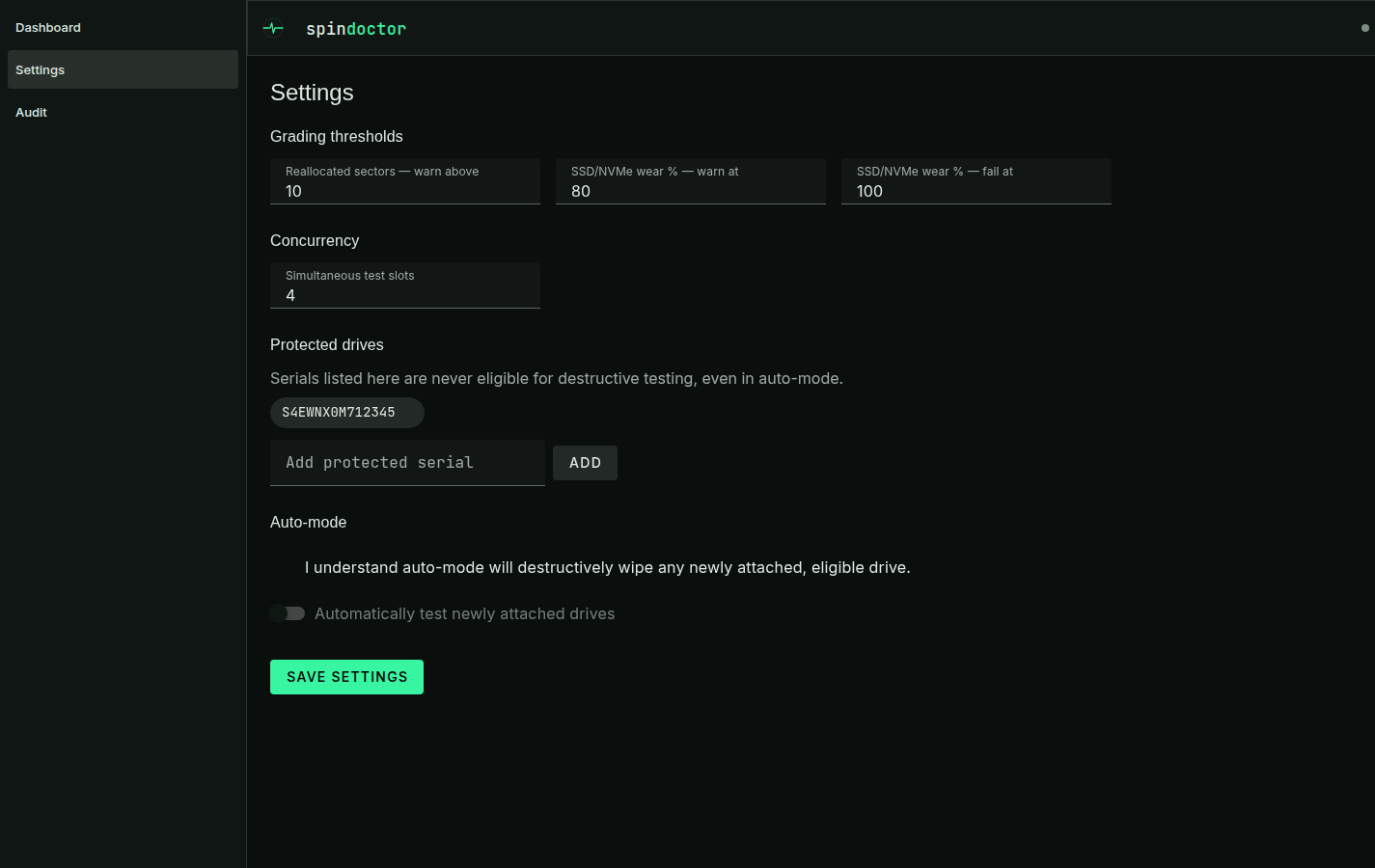
The protected-serial list is always honored. Any serial you add to the protect list in Settings is refused, including in auto-mode. Entries are matched ignoring case and surrounding whitespace.
These same checks are enforced twice: once in the browser UI (so an ineligible drive is visibly blocked before you even try), and again, independently, on the server for every POST /api/runs — so they hold even if a client bypasses the UI.
What the container cannot see
lsblk reports the mountpoints of the calling process's mount namespace. In the container the host's / and /boot are not mounted, so no host drive reports a mountpoint there — a mounted-drive check built only on lsblk cannot fire inside the deployment spindoctor ships as.
That is why the exclusive-access check exists: a claim on a block device lives in the kernel, not in a mount table, so it answers the same question from any namespace. If the check itself cannot run, spindoctor logs that it could not establish who is using the drive rather than reporting the drive as free.
For a deterministic, namespace-proof refusal, name the system disk by serial:
environment:
  - SPINDOCTOR_SYSTEM_DISK_SERIALS=YOUR-SYSTEM-DISK-SERIAL
Serials survive namespace differences, device renumbering (/dev/sdb today, /dev/sdc after a reboot) and restarts, which device paths do not.
The pre-write safety re-check
A destructive run's safety check runs once when the run starts — but the long self-test that runs before the surface stage can take hours, during which a drive could be unmounted and remounted, added to the protect list, or could vanish entirely. So immediately before the destructive badblocks -w write actually begins, the drive is re-resolved and re-checked against the same guards, never trusting the snapshot the run started with. If the drive is no longer eligible (or no longer present), the write is refused and the run fails safely instead of proceeding on stale information.
Stopping a run and what cannot be killed
A run can be stopped from the dashboard, or with POST /api/runs/:id/abort. Stopping a self-test also tells the drive to stop its firmware routine — dropping out of the poll loop would otherwise leave it running on its own for hours.
Stopping a surface scan is harder, because a badblocks blocked in an uninterruptible kernel I/O wait — the normal state for a drive with media errors, which is exactly what this tool is pointed at — cannot be killed at all, not even with SIGKILL. So the teardown is: SIGTERM, then SIGKILL after a grace period, then give up and settle the stage anyway, so one stuck process can never wedge the run (or leak the concurrency slot behind it).
Giving up is not the same as forgetting. A drive whose surface process was abandoned stays ineligible — reported as in use, and refused by the guards — until that process is genuinely gone. Otherwise the run would end, release the drive, and the next start would write the same platters underneath a scan that is still running: each pass would then read the other's pattern and report invented bad blocks. The drive frees itself as soon as the process exits; nothing needs restarting.
Typed-serial confirmation
Starting a destructive run manually requires typing the drive's exact serial number into a confirmation field in the UI before the "Wipe & test" button is enabled. The same requirement is enforced again by the API: a POST /api/runs for a destructive mode without a matching confirm field is rejected.
Auto-mode acknowledgment
Auto-mode cannot be turned on silently. The toggle in Settings stays disabled until you check an explicit acknowledgment box — "I understand auto-mode will destructively wipe any newly attached, eligible drive." Unchecking the box always forces the toggle back off; it can never be saved on while unacknowledged.
No web-UI authentication in v1
The web UI and API have no authentication in this version. It is built to be run on a trusted LAN — do not expose it directly to the internet. Combined with the guards above, this means anyone who can reach the UI/API can start a destructive run against any eligible, non-protected drive attached to the host; network-level access control is your responsibility.
What these guards don't do
They reduce risk, they don't eliminate it. Nothing here protects a drive that was never told about the guard — most importantly, you decide which physical drives get passed through to the container in the first place (see device passthrough). spindoctor cannot warn you about a drive it was never told to protect. Double-check lsblk on the host before you pass any device through.